Sometimes WHM and cPanel are displaying certain amount of disk usage for one particular cpanel user, but that’s not the real disk usage, you find out that it is an incorrect disk usage. When the system is showing wrong disk usage on cPanel, you will have to investigate user’s disk usage using the shell.
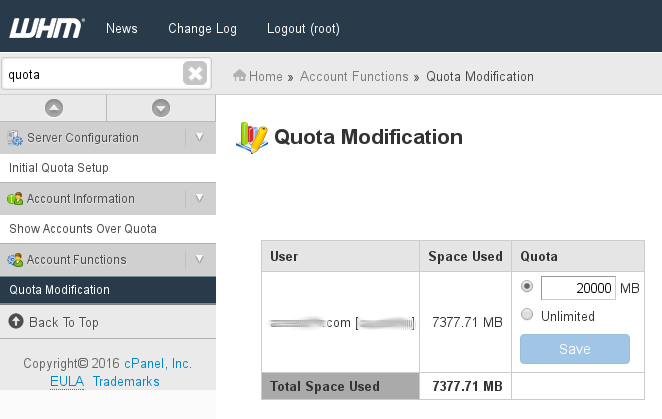 WHM showing Wrong Disk Usage on cPanel Accounts
How to fix wrong disk usage on cPanel and WHM
First thing to try to fix the incorrect disk usage is to run the famous /scripts/fixquotas
This useful script will correct all errors on disk usage quotas, 99% of the times this is the only thing you’ll need to fix disk usage errors showing on WHM panel.
Run this script as root:
/scripts/fixquotas
Depending on your disks speed, it may take a few minutes fixing the incorrect disk usage.
If that doesn’t fix your wrong disk usage on cPanel and WHM panels, let’s try something else.
For this solution, we will use the du command that will help us to find out the exact size of user directories.
du -shc /home/user/*
Replace “user” with your real system username.
In our case, that was showing around 3GB for that account, however, cPanel and WHM still reported disk usage for that user around 6GB. Where the hell are the other additional 3GB? Let’s find out.
Find User Disk Usage on cPanel
To find out if that user owns any other files outside his home directory, we will use this command:
find / -mount -wholename /home -prune -o -wholename /usr/share/cagefs-skeleton -prune -o -user useraccount -exec stat -c '%s %n' {} \; >> ~/user-files.out
Remember to replace “useraccount” with the real system user you are searching.
The results will be saved inside this file:
/root/user-files.out
You can review the results by using cat command:
cat /root/user-files.out
Output example:
[root@server.nixcp.com:~]cat ~/user-files.out
0 /var/spool/mail/useraccount
16 /var/cagefs/48/useraccount/.cagefs/.cagefs.token
4096 /var/cagefs/48/useraccount/etc/cl.php.d
4096 /var/cagefs/48/useraccount/etc/cl.php.d/alt-php70
719 /var/cagefs/48/useraccount/etc/cl.php.d/alt-php70/alt_php.ini
4096 /var/cagefs/48/useraccount/etc/cl.php.d/alt-php55
929 /var/cagefs/48/useraccount/etc/cl.php.d/alt-php55/alt_php.ini
4096 /var/cagefs/48/useraccount/etc/cl.php.d/alt-php54
929 /var/cagefs/48/useraccount/etc/cl.php.d/alt-php54/alt_php.ini
4096 /var/cagefs/48/useraccount/etc/cl.php.d/alt-php53
929 /var/cagefs/48/useraccount/etc/cl.php.d/alt-php53/alt_php.ini
4096 /var/cagefs/48/useraccount/etc/cl.php.d/alt-php44
437 /var/cagefs/48/useraccount/etc/cl.php.d/alt-php44/alt_php.ini
4096 /var/cagefs/48/useraccount/etc/cl.php.d/alt-php51
731 /var/cagefs/48/useraccount/etc/cl.php.d/alt-php51/alt_php.ini
4096 /var/cagefs/48/useraccount/etc/cl.php.d/alt-php52
892 /var/cagefs/48/useraccount/etc/cl.php.d/alt-php52/alt_php.ini
4096 /var/cagefs/48/useraccount/etc/cl.php.d/alt-php56
929 /var/cagefs/48/useraccount/etc/cl.php.d/alt-php56/alt_php.ini
4096 /var/cagefs/48/useraccount/etc/cl.selector
0 /etc/vdomainaliases/website.com
28 /etc/valiases/website.com
0 /etc/vfilters/website.com
[root@server.nixcp.com:~]
Warning: do not delete any of the files in that list unless you are 100% completely sure that are not related to cPanel, System or CloudLinux configurations, otherwise your user account may stop working normally.
