Taxonomy can be thought of classifying website content which display specific content based on taxonomy terms. Drupal taxonomy is made up of −
-
Term − It is used to manage or describe the content.
-
Vocabulary − It is set of terms.
Following are the steps to work with Drupal Taxonomy −
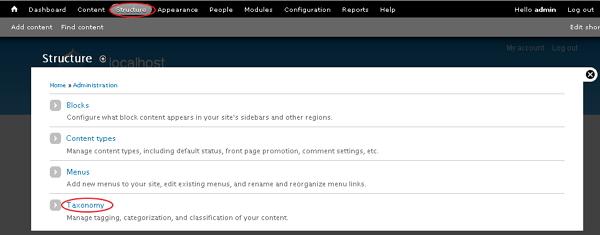
Step 1 − Go to Structure and click the Taxonomy option.
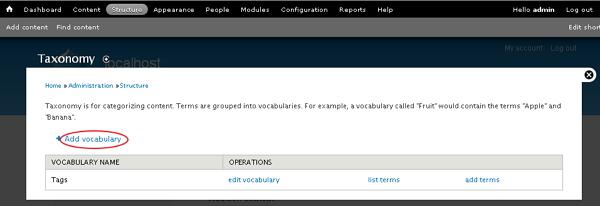
Step 2 − You can create a new vocabulary for Drupal taxonomy by clicking on Add vocabulary link.
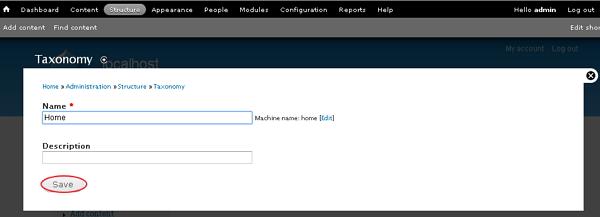
Step 3 − You will get a screen with Name field for adding name for your vocabulary which is mandatory and Description field is used for adding description for the vocabulary. Click the Save button.
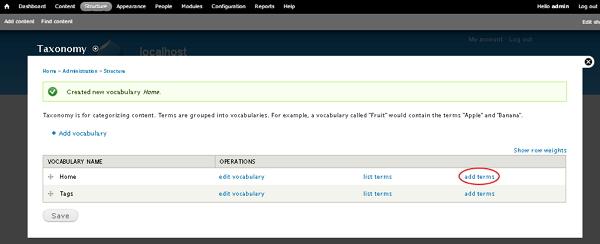
Step 4 − Click add terms to add new terms to the created vocabulary as shown in the following screen.
Step 5 − The screen shows some fields as seen in the following screen.
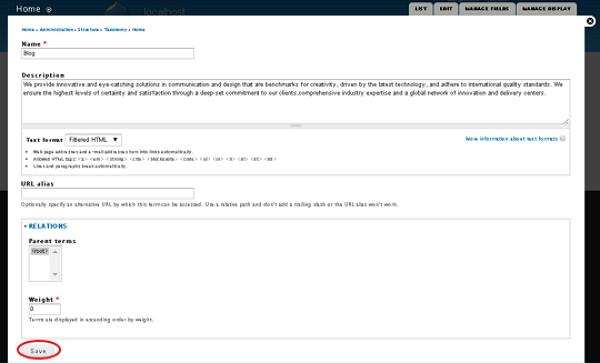
Following are the details of the fields present in the preceding screen.
-
Name− It specifies name of the term.
-
Description− It is used for adding description for the term.
-
Text format− It provides different types of formats by using dropdown menu.
-
URL alias− It optionally specifies an alternative URL by which this term can be accessed.
-
Relations
-
Parent Terms − In this field, you can set a term as the parent term.
-
Weight − Specifies weight for each term which will then display in ascending order by weight.
-
After filling all the fields, click the Save button.
The End! should you have any inquiries, we encourage you to reach out to the Vercaa Support Center without hesitation.
