Navigating the cPanel Dashboard: A Login Guide"

thumb_up 1  ·  sell cPanel login process, Accessing cPanel dashboard, Logging into cPanel control panel

In this chapter, we will learn to login into the cPanel Dashboard. For logging into the dashboard, you will need your login credentials. This information is sent to you, when you have signed up for cPanel hosting or you may have created during purchase of hosting.

cPanel Dashboard is accessible by two ports – 2082 for unsecured connections and 2083 for secured connection, many hosting providers support unsecured connections, but it is always recommended that you should use a secured connection only.

There are many ways to find the login screen of a cPanel. Recommended is that you may use the IP address of your cPanel, you may find the cPanel using IP address by typing the following in address bar −


If you have already updated your Nameservers for your domain, then you may use your domain for directly accessing cPanel by your domain. You may find cPanel login screen using your domain by typing the following into the address bar −


Once you are redirected to your login screen, you will find the login screen like shown below.
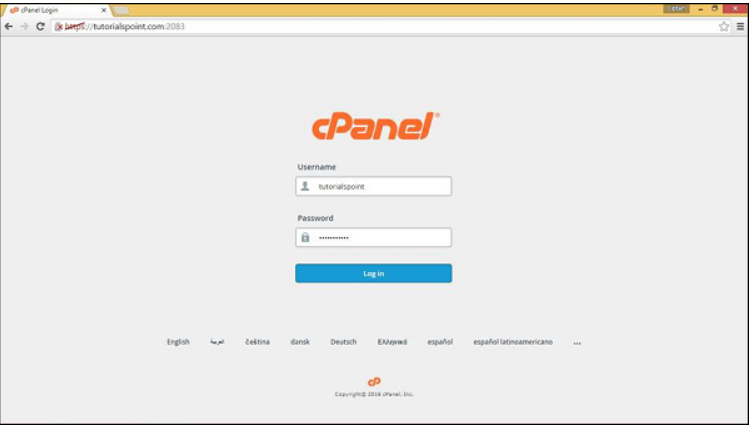
You can enter the Username and Password and press the Log in button to login into the cPanel Dashboard.

The End! should you have any inquiries, we encourage you to reach out to the Vercaa Support Center without hesitation.

Was this answer helpful?

Related Articles

description

How to Transfer Your Main Domain to Another cPanel as an Add-on Domain Safely and Without Data Loss

Here, in this tutorial, we will discuss the procedure to move primary domain to a different cPanel as an add-on domain without losing data.…

arrow_forward
description

How to Modify the Admin Password in AbanteCart

AbanteCart is a free E-Commerce solution that allows user to create and manage E-commerce website. Here, in this tutorial we will discuss…

arrow_forward
description

Modifying the Admin Password in OpenCart

Here, in this tutorial we will discuss the procedure to change OpenCart Admin Password. We have shared articles related to installation of…

arrow_forward
description

How to Monitor cPanel/WHM User Activities from WHM Root?

Login to WHM with root access. Navigate to Plugins section and select ConfigServer Security & Firewall.     On the next…

arrow_forward
description

Modifying WordPress Site's CSS File via cPanel

Login to cPanel associated with your WordPress website. Go inside File Manager section and then get into WordPress installation.…

arrow_forward
arrow_back « Back