Exploring Styling Options in cPanel: Customizing Your User Experience"

thumb_up 1  ·  sell cPanel interface styles, Personalizing cPanel appearance, Custom cPanel dashboard themes

You can change cPanel’s look and feel using this interface. cPanel has two major interface styles in which you can manage your web hosting. Although these interface is very standard, but these can be modified by your server administrator or reseller account admin to change its logo and icons etc.

To modify your cPanel Style follow these steps −

Step 1 − In cPanel Home click username written over the right corner of your dashboard.
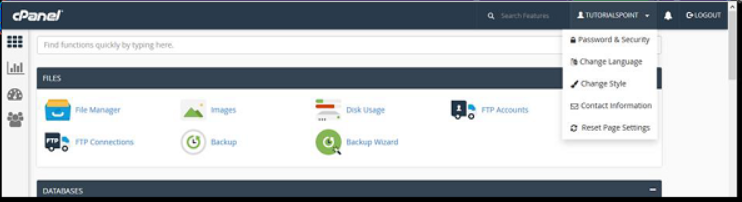


Step 2 − Click Change Style option. You will find Change Style Interface.
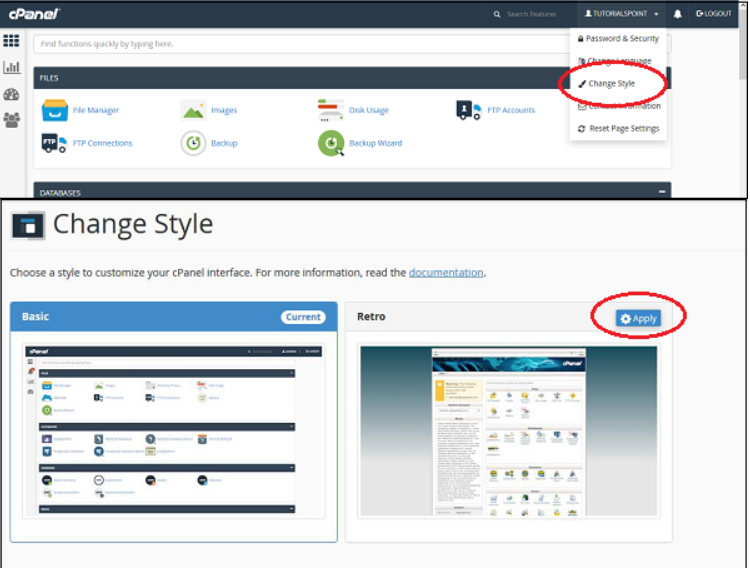
 

Step 3 − Choose any style option from the available styles, click Apply button which can be found over the top of the style to load the new style.

 

Step 4 − cPanel will automatically reload to apply the new setting and you will find a new interface according to the one you selected.

The End! should you have any inquiries, we encourage you to reach out to the Vercaa Support Center without hesitation.

Was this answer helpful?

Related Articles

description

How to Transfer Your Main Domain to Another cPanel as an Add-on Domain Safely and Without Data Loss

Here, in this tutorial, we will discuss the procedure to move primary domain to a different cPanel as an add-on domain without losing data.…

arrow_forward
description

How to Modify the Admin Password in AbanteCart

AbanteCart is a free E-Commerce solution that allows user to create and manage E-commerce website. Here, in this tutorial we will discuss…

arrow_forward
description

Modifying the Admin Password in OpenCart

Here, in this tutorial we will discuss the procedure to change OpenCart Admin Password. We have shared articles related to installation of…

arrow_forward
description

How to Monitor cPanel/WHM User Activities from WHM Root?

Login to WHM with root access. Navigate to Plugins section and select ConfigServer Security & Firewall.     On the next…

arrow_forward
description

Modifying WordPress Site's CSS File via cPanel

Login to cPanel associated with your WordPress website. Go inside File Manager section and then get into WordPress installation.…

arrow_forward
arrow_back « Back