In this chapter, we will study about Book Module in Drupal. Books have an in-built hierarchical navigation, which means that you can organize them to read in a special order. The book content type also allows you to make your website content easier to print by site visitors.
Following are the simple steps to configure Book module in Drupal.
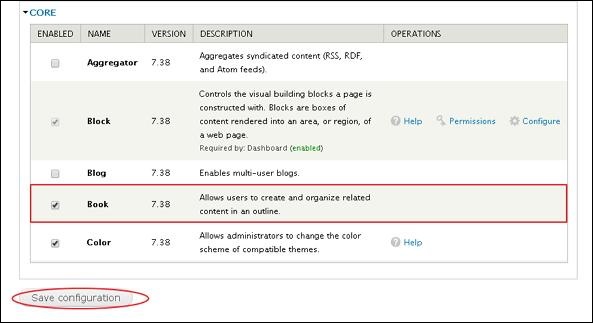
Step 1 − Enable the Book in Modules and click Save configuration.
Step 2 − Click on Content and check the boxes, select the content type that you want to enable for books.
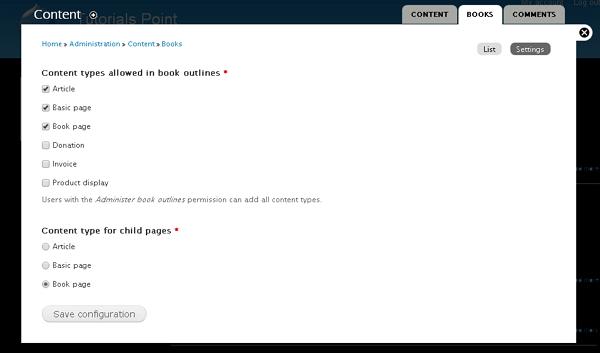
Click Save configuration to save your content type.
Step 3 − Click Create content -> Book page or on Shortcut bar Book page as shown in the following screen.
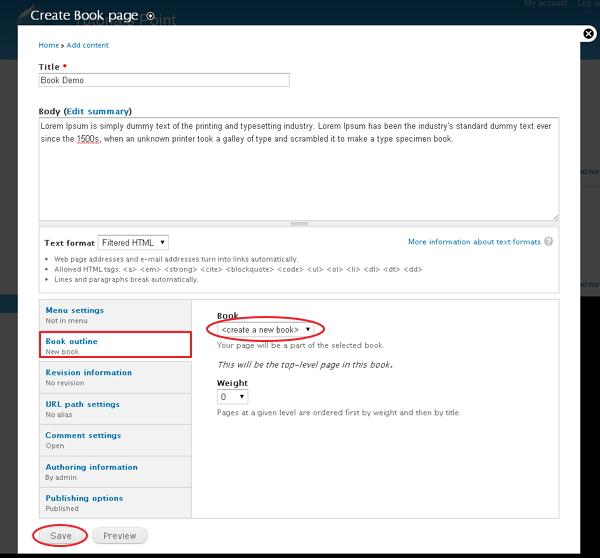
Spread out the section under Book outline and select create a new book. You can set the weight to 0.
Click the Save button and your top level page is created.
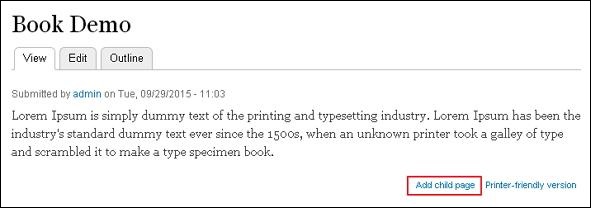
Step 4 − Once your book has been created, you can create child pages by clicking the Add child link at the bottom of the book page.
Step 5 − Further, click Content management -> Books -> List as shown in the following screen. Click on edit order and titles under Operations column.
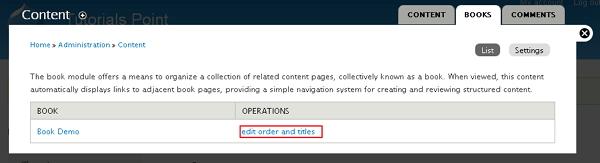
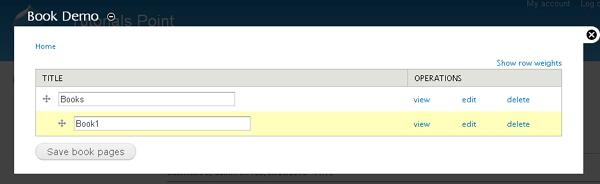
Step 6 − You will see the screen as shown in the following screen. This page allows you to move your book pages around to fit your needs. Press and hold on the four pronged arrow and move it to the position to rearrange your pages. You can also drag the page to the right to make it a child page.
The End! should you have any inquiries, we encourage you to reach out to the Vercaa Support Center without hesitation.
