Connecting Remotely: A Guide to Using Remote MySQL in cPanel

thumb_up 1  ·  sell cPanel remote MySQL setup, Accessing databases remotely using cPanel, Managing remote database connections in cPanel

This feature of cPanel allows remote servers or web application to access a database hosted on your account. If a server or web application tries to access the database on your account, which is not provided access to, then cPanel will not allow this host to access your database. But, if you have an application, whom you wish to grant access to your databases, you can add their host names or IP address here.

To access this interface, click on Remote MySQL link found in your Database Section of your cPanel.

 

Add Access Host

To Add Access Host, which can access your databases when needed. You will have to enter Host Name in text input. You can enter hostnames in three types.
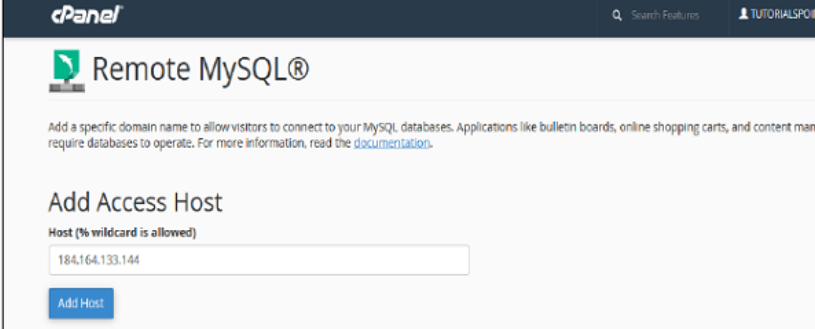


Remove Access Host

To deny access to a web application having access to the databases, click the Delete link from the list of Access host.



The End! should you have any inquiries, we encourage you to reach out to the Vercaa Support Center without hesitation.

Was this answer helpful?

Related Articles

description

How to Transfer Your Main Domain to Another cPanel as an Add-on Domain Safely and Without Data Loss

Here, in this tutorial, we will discuss the procedure to move primary domain to a different cPanel as an add-on domain without losing data.…

arrow_forward
description

How to Modify the Admin Password in AbanteCart

AbanteCart is a free E-Commerce solution that allows user to create and manage E-commerce website. Here, in this tutorial we will discuss…

arrow_forward
description

Modifying the Admin Password in OpenCart

Here, in this tutorial we will discuss the procedure to change OpenCart Admin Password. We have shared articles related to installation of…

arrow_forward
description

How to Monitor cPanel/WHM User Activities from WHM Root?

Login to WHM with root access. Navigate to Plugins section and select ConfigServer Security & Firewall.     On the next…

arrow_forward
description

Modifying WordPress Site's CSS File via cPanel

Login to cPanel associated with your WordPress website. Go inside File Manager section and then get into WordPress installation.…

arrow_forward
arrow_back « Back