Python Continue Statement: Skipping Iterations in Loops

thumb_up 1  ·  sell The continue statement in Python returns the control to the begi, the loop starts next iteration without executing the remaining s, Using continue in Python loops, Skipping loop iterations in Python, Python continue statement

The continue statement in Python returns the control to the beginning of the current loop. When encountered, the loop starts next iteration without executing the remaining statements in the current iteration.

The continue statement can be used in both while and for loops.

Syntax

continue

Flow Diagram

The flow diagram of the continue statement looks like this −
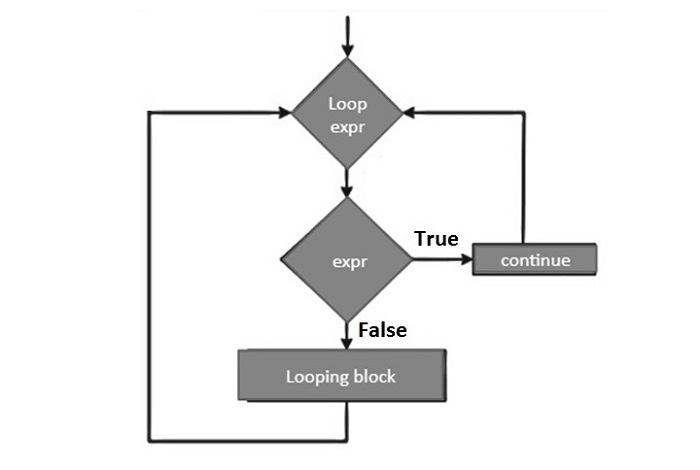
The continue statement is just the opposite to that of break. It skips the remaining statements in the current loop and starts the next iteration.

Example 1

Now let's take an example to understand how the continue statement works in Python −

 
for letter in 'Python': # First Example if letter == 'h': continue print ('Current Letter :', letter) var = 10 # Second Example while var > 0: var = var -1 if var == 5: continue print ('Current variable value :', var) print ("Good bye!")

When the above code is executed, it produces the following output −

Current Letter : P Current Letter : y Current Letter : t Current Letter : o Current Letter : n Current variable value : 9 Current variable value : 8 Current variable value : 7 Current variable value : 6 Current variable value : 4 Current variable value : 3 Current variable value : 2 Current variable value : 1 Current variable value : 0 Good bye!

Example 2: Checking Prime Factors

Following code uses continue to find the prime factors of a given number. To find prime factors, we need to successively divide the given number starting with 2, increment the divisior and continue the same process till the input reduces to 1.

The algorithm for finding prime factors is as follows −

  • Accept input from user (n)

  • Set divisor (d) to 2

  • Perform following till n>1

  • Check if given number (n) is divisible by divisor (d).

  • If n%d==0

    • a. Print d as a factor

    • Set new value of n as n/d

    • Repeat from 4

  • If not

  • Increment d by 1

  • Repeat from 3

Given below is the Python code for the purpose −

 
num = 60 print ("Prime factors for: ", num) d=2 while num>1: if num%d==0: print (d) num=num/d continue d=d+1

On executing, this code will produce the following output −

Prime factors for: 60
2
2
3
5

Assign different value (say 75) to num in the above program and test the result for its prime factors.

Prime factors for: 75
3
5
5


The End! should you have any inquiries, we encourage you to reach out to the Vercaa Support Center without hesitation.



Was this answer helpful?

Related Articles

description

Exploring Python's Key Characteristic

Python is a feature rich high-level, interpreted, interactive and object-oriented scripting language. This tutorial will list down some of…

arrow_forward
description

Comparing Python and C++

Both Python and C++ are among the most popular programming languages. Both of them have their advantages and disadvantages. In this…

arrow_forward
description

Creating a Python Hello World Program

This tutorial will teach you how to write a simple Hello World program using Python Programming language. This program will make use of…

arrow_forward
description

Python's Versatile Application Domains

Python is a general-purpose programming language. It is suitable for development of wide range of software applications. Over last few…

arrow_forward
description

Understanding the Python Interpreter

Python is an interpreter-based language. In a Linux system, Python's executable is installed in /usr/bin/ directory. For Windows, the…

arrow_forward
arrow_back « Back