In Python, module is a Python script with .py extension and contains objects such as classes, functions etc. Packages in Python extend the concept of modular approach further. Package is a folder containing one or more module files; additionally a special file "__init__.py" file which may be empty but may contain the package list.
Let us create a Python package with the name mypackage. Follow the steps given below −
-
Create an outer folder to hold the contents of mypackage. Let its name be packagedemo.
-
Inside it, create another folder mypackage. This will be the Python package we are going to construct.Two Python modules areafunctions.py and mathfunctions.py will be created inside mypackage.
-
Create an empty "__.init__.py" file inside mypackage folder.
-
Inside the outer folder, we shall later on store a Python script example.py to test our package.
The file/folder structure should be as shown below −
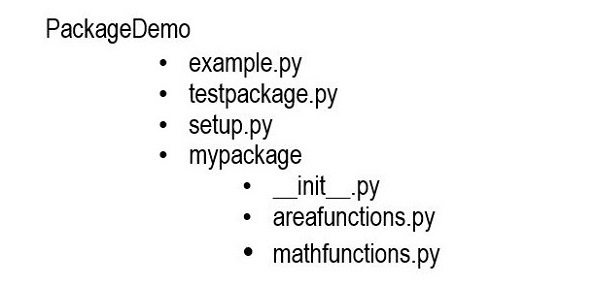
Using your favorite code editor, save the following two Python modules in mypackage folder.
Create another Python script −
Let us now test the myexample package with the help of a Python script above this package folder. Refer to the folder structure above.
This program imports functions from mypackage. If the above script is executed, you should get following output −
Area : 200
average: 15.0
Define Package List
You can put selected functions or any other resources from the package in the "__init__.py" file. Let us put the following code in it.
To import the available functions from this package, save the following script as testpackage.py, above the package folder as before.
It will produce the following output −
Area of circle: 78.53981633974483
10 raised to 2: 100
Package Installation
Right now, we are able to access the package resources from a script just above the package folder. To be able to use the package anywhere in the file system, you need to install it using the PIP utility.
First of all, save the following script in the parent folder, at the level of package folder.
Run the PIP utility from command prompt, while remaining in the parent folder.
C:\Users\user\packagedemo>pip3 install .
Processing c:\users\user\packagedemo
 Preparing metadata (setup.py) ... done
Installing collected packages: mypackage
 Running setup.py install for mypackage ... done
Successfully installed mypackage-0.1
You should now be able to import the contents of the package in any environment.
C:\Users>python
Python 3.11.2 (tags/v3.11.2:878ead1, Feb 7 2023, 16:38:35) [MSC v.1934 64 bit (AMD64)] on win32
Type "help", "copyright", "credits" or "license" for more information.
>>> import mypackage
>>> mypackage.circle(5)
78.53981633974483


The End! should you have any inquiries, we encourage you to reach out to the Vercaa Support Center without hesitation.
